Browser extension · Chrome & Firefox
QuickTab
A browser extension I designed, built, and published for Chrome and Firefox. It lets you find, switch between, and close your open tabs from one searchable list, across every window.
The problem
Too many tabs, not enough time
When you're working across dozens of tabs and several browser windows, finding one specific page means clicking through tab after tab, or squinting at icons too small to read. Tabs pile up, and the browser gets harder to use the more you rely on it.
The solution
One searchable list of everything you have open
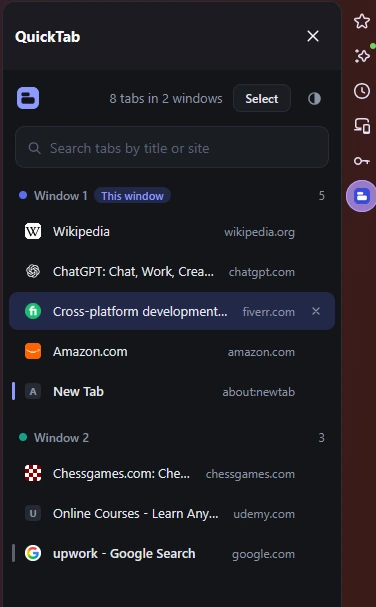
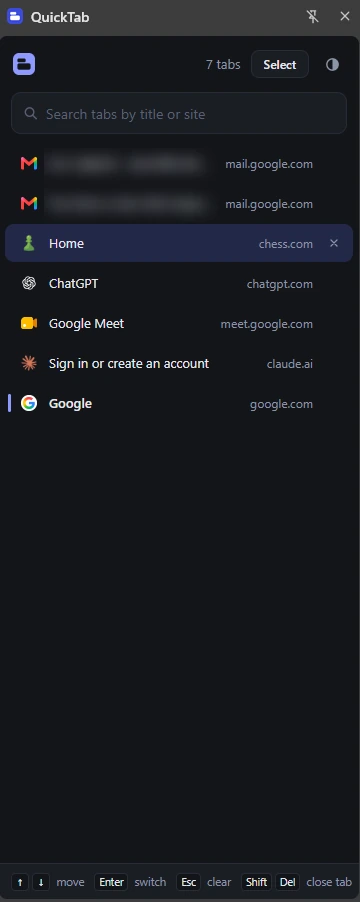
QuickTab puts all of your open tabs in a single list in the browser's side panel. Start typing and the list filters as you go. Choose a result to switch to it, and close the tabs you're not using, either one by one or several at once.
The goal is simple: help people manage a large number of tabs without wasting time searching through them by hand.
Features
What it does
Search by title or site
Type part of a page title or a site name, like "docs" or "amazon", and the list narrows to the matching tabs.
Every window in one list
Tabs from all open browser windows appear together, grouped by window, with the current one labeled.
Jump straight to a tab
Pick a result and QuickTab switches to that tab, even if it's in a different window.
Close tabs one at a time or in bulk
Close a tab you're not using right from the list, or use Select to pick several and close them all at once.
Keyboard friendly
Use the arrow keys to move, Enter to switch, Esc to clear the search, and Shift + Delete to close a tab.
Chrome and Firefox
Available on the Chrome Web Store and Firefox Add-ons, opening in the browser's side panel or sidebar.
Try it
Install QuickTab
QuickTab is available from the official Chrome and Firefox extension stores.
Need something similar?
Tell me about the process you'd like to improve.